Electrical symbol library
Choose from dedicated symbols for common electrical distribution, protection and load components.
Electrical single-line diagram software
Build electrical single-line diagrams with dedicated symbols for distribution, protection and loads — without installing traditional CAD software.
Place transformers, busbars, circuit breakers, motors and other electrical components, connect the circuit and edit the drawing directly in your browser.
No installation · No account to try · PDF · SVG · DWG
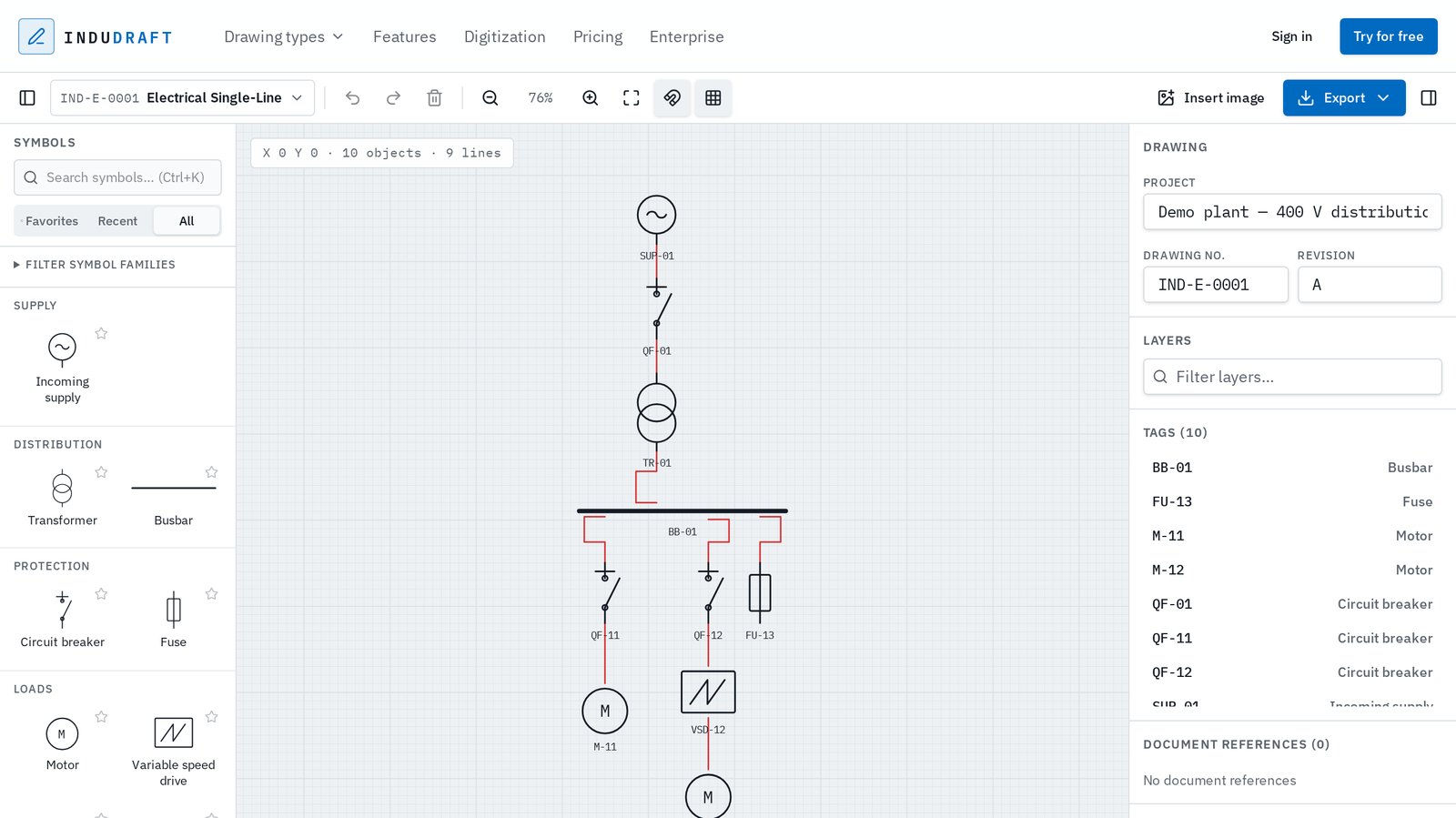
A single-line diagram should communicate the electrical system clearly without turning the drawing process into a software project of its own.
InduDraft gives engineers a focused browser-based editor for placing electrical components, connecting them and preparing a clean drawing for documentation or further CAD work.
There is no software package to install and no account is required to try the editor.
Choose components from the electrical symbol library and place them on the drawing.
Use components such as transformers, busbars, circuit breakers, fuses, motors and variable-speed drives.
Connect the electrical components to show the distribution path through the system.
Select components and add tags, descriptions and other available properties.
Export the completed drawing as PDF or SVG, keep the editable InduDraft file, or create DWG linework for CAD workflows.
Choose from dedicated symbols for common electrical distribution, protection and load components.
Search and place components directly on the drawing instead of assembling diagrams from generic shapes.
Connect components to show the electrical distribution path clearly.
Keep equipment tags and available properties attached to the drawing objects.
Open the editor and work without installing a dedicated desktop drawing package.
Export visual documents or hand the drawing over as DWG linework when CAD delivery is required.
Some electrical engineering platforms combine the single-line diagram with load flow, short-circuit studies, protection coordination and equipment sizing.
InduDraft has a different purpose. It is a lightweight drawing tool for creating and editing the diagram itself.
That makes it useful when the job is to prepare, update or deliver a clear electrical single-line drawing without needing a full power-system analysis package.
Need load flow, short-circuit or protection studies? InduDraft does not currently perform these calculations.
General-purpose diagram applications can be used to sketch almost anything, but electrical single-line drawings have their own components and conventions.
InduDraft provides a dedicated electrical symbol library and drawing workflow, so you can focus on the system you are documenting rather than building your own diagram toolkit.
Build a clear overview of an electrical distribution system from a blank drawing.
Update equipment, tags or connections when an existing electrical drawing changes.
Prepare electrical single-line diagrams for packaged equipment and project documentation.
Quickly communicate the intended electrical structure before detailed engineering is complete.
Create the drawing in InduDraft and export DWG linework when the next workflow requires a CAD file.
The terms single-line diagram, one-line diagram and SLD are commonly used for simplified drawings of an electrical power system.
Rather than drawing every conductor individually, the diagram uses a single line and electrical symbols to communicate the main distribution structure and equipment.
InduDraft uses the term “single-line diagram” throughout the product, but the editor is intended for the same general class of electrical drawing.
InduDraft's electrical symbols reference familiar IEC drawing conventions.
InduDraft is not certified or endorsed by this standards organisation. Symbols are maintained as part of InduDraft's own drawing library.
DWG exports contain editable geometry. They are not intelligent electrical CAD objects.
A single-line diagram is a simplified representation of an electrical power system. It uses standard electrical symbols and a single line to show the main distribution path and major equipment without drawing every individual conductor.
SLD software is used to create and maintain electrical single-line diagrams. Depending on the application, it may focus purely on drawing or also include electrical calculations and power-system studies.
Yes. InduDraft's single-line editor runs directly in the browser. You can open the demo without installing software or creating an account.
No. InduDraft currently focuses on drawing and editing the single-line diagram. It is not a load-flow, short-circuit or protection-coordination analysis package.
Yes. Signed-in users can export AutoCAD 2018-compatible 2D DWG geometry today. It is editable CAD geometry, not intelligent electrical CAD objects. DWG is planned as a Pro feature after the preview period.
No. You can create and edit the drawing directly in InduDraft without AutoCAD. A DWG export is available when the drawing needs to continue into a CAD workflow.
The terms are commonly used for the same type of simplified electrical power-system drawing. “SLD” is an abbreviation for single-line diagram.
Yes. You can open the demo editor and try the drawing workflow without creating an account.
New to single line diagrams? Read how to draw a single line diagram. Drawing process diagrams as well? See P&ID software.
Open the editor, place your first electrical components and start connecting the system. No installation and no account required to try.