Real dimensions
Width and height are in millimetres and can be edited per object.
General arrangement drawing software
Plan control cabinets, position equipment and create clear industrial layouts with ready-to-use components and real dimensions — without complicated CAD software.
Lay out control cabinets with DIN rails, cable ducts, PLCs, power supplies and terminals — or place equipment in a room or plant area — using real dimensions in millimetres.
No installation · No account to try · PDF · SVG · DWG
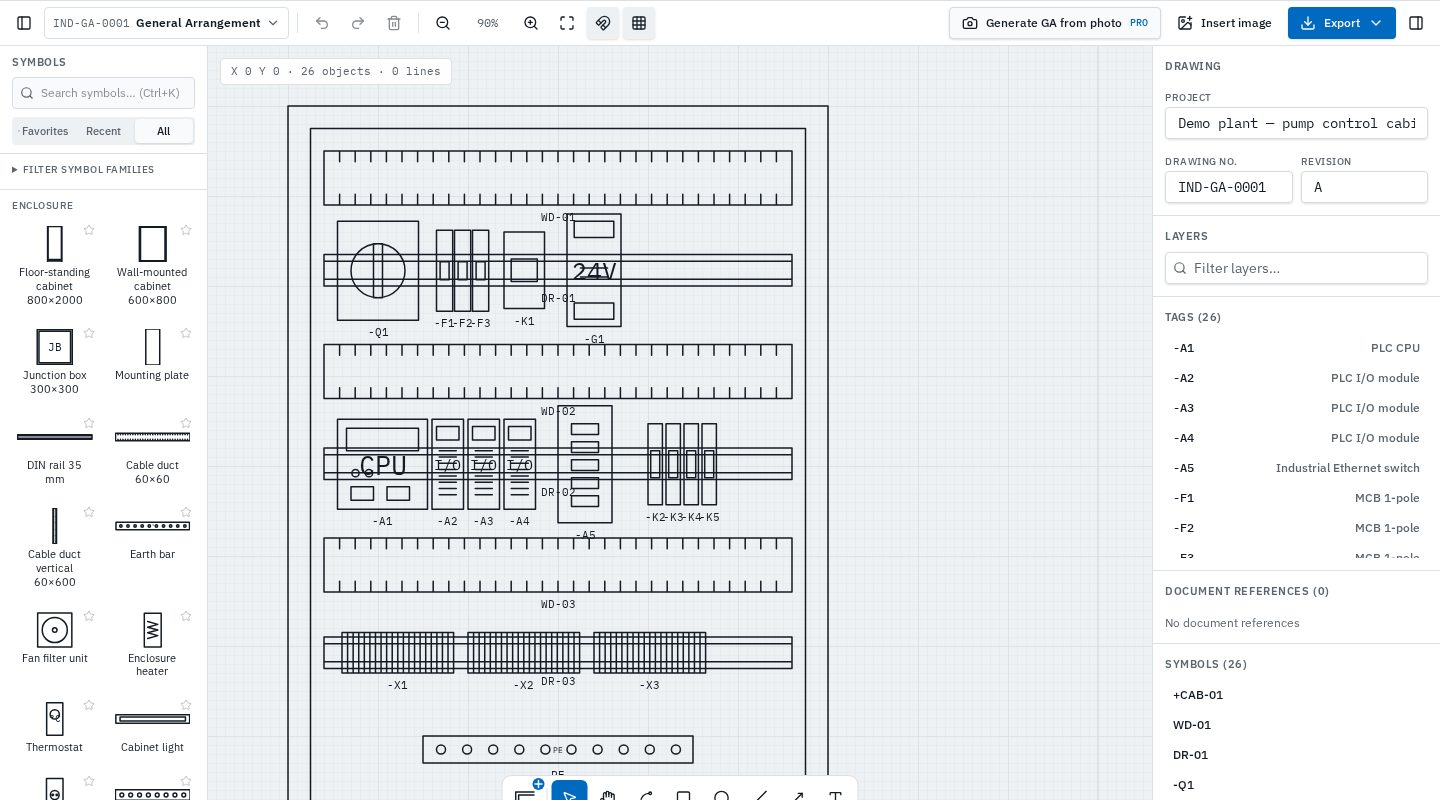
From equipment layouts to general technical documentation, InduDraft helps you organize drawing elements in a focused workspace without the overhead of traditional CAD.
Start with a cabinet, mounting plate, room or plant area.
Search the GA library and place components. Objects use real dimensions you can adjust.
Add tags, manufacturer, part numbers and other properties to each object.
Export PDF or SVG, keep the editable InduDraft file, or create DWG linework.
Work with available drawing tools and libraries suited to arrangement drawings. Keep your workflow straightforward, from the first object to the finished drawing.
Width and height are in millimetres and can be edited per object.
Enclosures, DIN rails, cable ducts, earth bars, fans, heaters and gland plates.
PLC CPUs, I/O, switches, power supplies, UPS, drives, breakers, contactors and relays.
Rooms, doors, columns, tanks, pump skids, cable trays and walkways.
Keep tags, manufacturer, part number, depth and weight on the objects.
Turn a cabinet photo into editable objects to review. Included in Pro.
Prepare general arrangement drawings for engineering reviews, supplier documentation and project workflows using InduDraft’s supported export formats.
Generic diagram tools can draw rectangles, but a GA needs equipment you recognise, at the size it really is.
Plan mounting plates, rails, ducts and components before the panel is built.
Show where cabinets, tanks and skids sit in a room or area.
Deliver arrangement drawings with packaged equipment and record what is actually installed after changes on site.
Position DIN rails, cable ducts, PLCs, terminals and electrical equipment at real size.
GA objects are drawn as real-size outlines in millimetres, following general technical drawing practice rather than a fixed symbol standard.
InduDraft is not certified or endorsed by any standards organisation. Objects are part of InduDraft's own library.
DWG export produces editable 2D CAD geometry, not intelligent AutoCAD objects.
A general arrangement (GA) drawing shows how equipment is physically laid out — for example the components inside a control cabinet, or equipment placed in a room or plant area.
Yes. GA objects in InduDraft use millimetres, and each object's width and height can be edited to match the actual equipment.
Enclosures, DIN rails, cable ducts, PLC CPUs and I/O modules, power supplies, breakers, contactors, relays, terminals, drives and plan-view objects such as rooms, tanks, pump skids and walkways.
Yes, with InduDraft Pro. Photo to GA turns a photo of a cabinet, component or area into editable real-size objects for you to check; low-confidence objects are marked for review and the photo stays as a faint locked underlay. It is planned as a Pro feature after launch.
Not in the same way as P&IDs. GA drawings normally show equipment outlines at real size, following general technical drawing practice rather than a fixed pictogram library.
Yes. Open the GA editor in your browser without creating an account.
Also drawing process or electrical diagrams? See P&ID software and single-line diagram software.
Open the editor with a sample cabinet layout. No installation and no account required to try.