Searchable P&ID symbols
Search valves, equipment and instrumentation instead of browsing through large generic shape libraries.
P&ID software
InduDraft is a purpose-built P&ID editor for creating process and instrumentation drawings without installing traditional CAD software.
Search for valves, vessels, pumps and instruments, place them on the drawing, connect process and signal lines, edit engineering tags and export the finished drawing.
No installation · No account to try · PDF · SVG · DWG
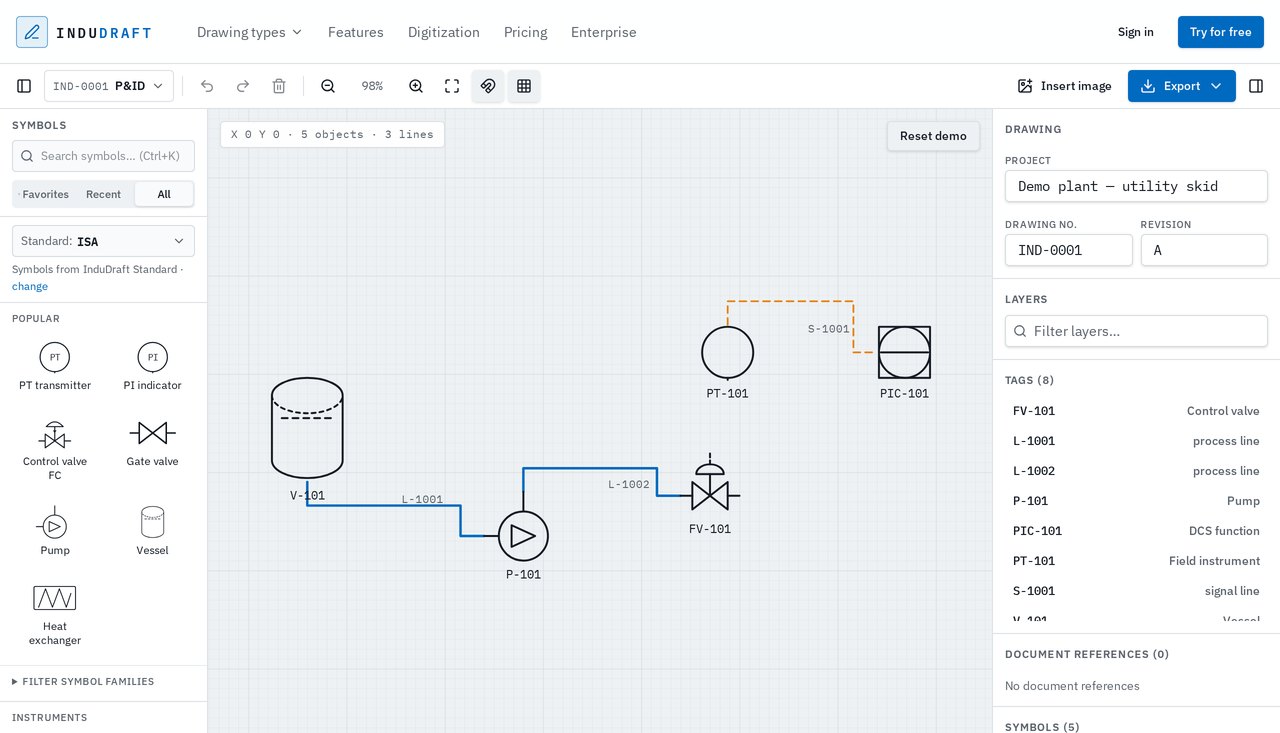
Creating or updating a P&ID should not require a large desktop installation just to move a valve, change a tag or add an instrument.
InduDraft runs directly in the browser and focuses on the parts of P&ID work engineers use every day: placing symbols, connecting equipment, editing tags and keeping drawing information attached to the objects on the page.
Open the editor and start drawing. There is nothing to install and no account is required to try it.
Search the symbol library for the equipment you need and place it directly on the drawing.
Use valves, pumps, vessels, instruments and other process symbols without building your own stencil library first.
Draw process lines and signal connections between components.
Connections stay part of the editable drawing instead of becoming a flattened image.
Select an object and add its tag, description and engineering properties from the Properties panel.
Keep drawing information attached to the component it belongs to.
Export the finished P&ID as PDF or SVG, keep an editable InduDraft file, or create DWG linework for CAD workflows.
DWG export contains editable 2D geometry. It does not create intelligent AutoCAD P&ID objects.
InduDraft is designed around industrial drawings instead of general-purpose flowcharts.
Search valves, equipment and instrumentation instead of browsing through large generic shape libraries.
Connect equipment and instruments using dedicated drawing and connection tools.
Add and update tags such as equipment, valve and instrument identifiers directly from the Properties panel.
Store useful drawing information on each object rather than relying only on text placed beside a symbol.
Open a drawing from your browser and continue working without setting up a dedicated CAD environment.
Deliver PDF or SVG, keep the editable InduDraft drawing, or export DWG geometry when a CAD file is required.
Traditional engineering software can require installation, licences and help from IT before the first drawing is opened.
InduDraft runs in the browser. That makes it especially useful when you need to make or review a drawing from a company computer where installing additional software is inconvenient.
Open InduDraft from a supported browser and start drawing.
The demo editor opens immediately so you can test the workflow before signing up.
A browser-based workflow makes InduDraft independent of a traditional Windows-only CAD installation.
General diagramming applications can draw boxes, lines and symbols. A P&ID needs a different workflow.
InduDraft is built around industrial drawing objects, tags, engineering properties, process connections and dedicated symbol libraries. That means less time adapting a generic canvas to engineering work.
Start from a blank drawing and create a P&ID using searchable equipment and instrument symbols.
Update tags, equipment and connections without opening a large plant-design environment.
Create straightforward process drawings for packages, skids and equipment deliveries.
Open and review drawings in a browser before exporting them for documentation.
Use an existing PDF or image as an underlay while rebuilding the drawing as editable objects.
Have a large archive of legacy P&IDs? Learn about InduDraft drawing digitization →
InduDraft's symbol library references familiar conventions used in industrial P&IDs, including ISA and ISO drawing practices.
InduDraft is not certified or endorsed by these standards organisations. Symbols are maintained as part of InduDraft's own drawing library.
DWG output is editable linework rather than intelligent AutoCAD P&ID blocks.
P&ID software is used to create piping and instrumentation diagrams that show process equipment, piping, valves, instruments and control relationships. Dedicated P&ID tools provide engineering symbols and drawing workflows that are more suitable for these diagrams than a general-purpose drawing application.
Yes. InduDraft runs in the browser, so you can create and edit a P&ID online without installing desktop CAD software. The demo can be opened without creating an account.
You can try the editor for free without an account. A free account can also be used to save drawings according to the current Free plan limits.
No. InduDraft runs independently in the browser. AutoCAD is not required to create or edit an InduDraft drawing.
Yes. InduDraft can export AutoCAD 2018-compatible 2D DWG geometry. DWG export produces editable 2D CAD geometry, not intelligent AutoCAD P&ID objects. It is included in InduDraft Pro.
A PDF or image can be used as an underlay while the drawing is recreated as editable InduDraft objects. The source PDF itself does not automatically become an intelligent editable P&ID.
InduDraft is focused on fast browser-based 2D industrial drawing and editing. It is not intended to replace 3D plant design, piping modelling or the full intelligent plant database functionality of systems such as Plant 3D.
The P&ID library includes industrial equipment, valves, instruments and related symbols. Search is built into the editor so symbols can be found quickly while drawing.
Working on electrical drawings too? See single-line diagram software.
Open the editor and make your first change in seconds. No installation and no account required to try.